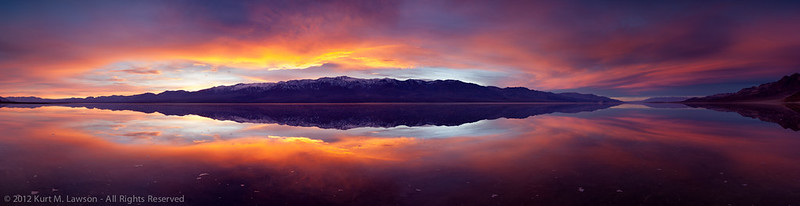
During my first visit to Death Valley National Park, I shot some pictures at sunrise at a location known as Badwater. This is the lowest point in North America, at 282 feet below sea level and thus the final low point for water entering the vast salt pan that makes up the main valley floor. Of course, not all water makes it to this point, but this does fill with a few inches of water on occasion, and in 2005 was deep enough for people to kayak across for the first time. The salt flat was interesting in that first visit. For miles and miles, a pale white-grey texture of salt crystals formed polygons off into the horizon. Mostly, these were very low but were well defined by more dense concentrations of salt crystals. The polygons of mud crusted with salt varied from place to place, but mostly followed a fairly uniform set of characteristics through the main part of the Badwater salt flat area. Here is a view to the north in 2008:
A northern view at Badwater in 2008
All in all, I honestly didn’t find the Badwater area to be terribly interesting. I was intrigued by the contrast to the west when standing in the shadow of the Black Mountains while the Panamint Range was fully bathed in sunlight, but the actual ground didn’t inspire me on this first visit and I didn’t come back for a few years. In late December 2010 everything changed at Badwater. Heavy rains flooded the salt flat with several inches of water. Whatever the salt flats looked like prior to being flooded, the flood waters erased everything. This made for some awesome images, including many that are my personal all-time favorites. Here though is a similar angle during the day. You can see the mud under the water. There is no sign of the salt crystals or the vertical uplift of polygonal shapes. In fact, there’s nothing of the polygons at all. The surface has been erased back to flat mud, with little bits of texture dotting the underwater landscape.
As soon as I freed up from work again, I headed straight back in the hopes that the water might still be there. What I saw instead was a vastly different landscape.
A northerly view at Badwater, March 2011
The water was gone. There was fresh salt everywhere. There were no polygonal shapes, only dotted miniature mesas as far as the eye could see, and salt crystals so bright white that it was at least as bright as snow. I was blown away by the change in the landscape. I returned in November to shoot my Christmas card. This time new polygons had formed. The flats were still brilliant bright white crystal salt, however.
A northerly view at Badwater, November 2011
In January 2012, the polygonal surface looked different yet again:
A northerly view at Badwater, January 2012
And finally we get to the present day, which can be seen in the first image at the beginning of this post, and here is also a western view from the same location showing the extent of the uplift.
Western view at Badwater, March 2013
The mud and salt crust at Badwater to me resembles the very fundamental forces that created mountain ranges everywhere. Here is my hypothesis based on my own random visits and observations. It seems as though the mud and salt solidified after the flood in 2011 into a fairly consistent texture. Then, as the environment of Death Valley added and subtracted moisture to the salt flat, the crust began to expand and contract with the temperature changes and the forming and dissolving action with moisture. Eventually, cracks form which allow more moisture to seep through with more salt, concentrating the salt at the cracks. The overall cracked pattern appears like that of dried mud but on a larger scale, with some polygonal chunks a few feet across. With the concentration of salt along the cracks, the crystals there begin to push the plates apart from one another as they grow. This creates uplift at the edges as the different sections of crust expand outward and crack along the edges forming miniature mountain ranges. The current state of Badwater seems similar to what I found at the edges of a circular white salt flat in the middle of largely mud about 3/4 a mile from the road to the south of Badwater. Here along the edges the salt had fractured up nearly a foot off the floor, tapering off into more flat white patterns towards the center of the circle. So perhaps what is happening now at Badwater is similar to what was happening at the edges of this circle, indicating less and less water until ultimately the salt flat just turns into mud resembling the Devil’s Golf Course section.
Huge uplift at the edge of circular salt flat, March 2011
Badwater is a much more fascinating place to me now since that first visit in 2008, and I have new appreciation for the way the Death Valley landscape is constantly changing. I wonder if anyone has done a study of the stages of the changing landscape at Badwater. It certainly seems to have cycles. I wonder what it will look like during my next visit. I’m looking forward to finding out.
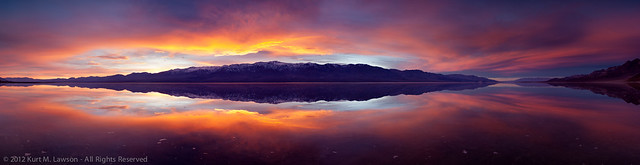
While getting ready to print some of my all time favorite photos, I took a closer look at the panorama I simply called “WOW” back in January 2011. “WOW” was pretty much the only thought I could think as I witnessed the most intense and amazing sunset spectacle yet to appear before this photographer’s eyes. The setting is Badwater, the lowest point in North America in the heart of Death Valley National Park. Unusually heavy rains hammered the valley in December 2010, resulting in a flood of this lowest point, which is typically a salt flat with polygonal fractures forming miniature salty techtonic plates as far as the eye can see. Instead of that interesting and otherworldly scene, a dramatically different landscape greeted me. The entire basin was covered with a temporary lake. This was an opportunity I was waiting for. I fell in love with Death Valley after my first visit in January 2008 with my friend and fellow photographer Robert Mance. Not long after that first visit, I immersed myself in reading about this park and it’s amazing landscapes. During that research I discovered the flood of February 2005. Images of a flooded Badwater amazed me, and so did the thought of kayaking across this miniature lake, something no humans probably had ever done. I vowed to keep an eye on the weather in the future, and winter 2010-2011 would give me the chance to capture this rare event. You can read more about my January 2011 adventures in my Tales of a Flooded Badwater posts – part 1 and part 2. My second night on the first trip to a flooded Badwater would yield this panorama. “Wow” is what I said to myself repeatedly out loud into the emptiness of the valley. “Thank you!” I shouted to the landscape as I trudged back to my car through the 8 inches of salty water.
I thought I’d use this image as an example of how I will approach photographic post processing, as well as taking you through the steps I took with the “Wow” panorama to arrive at the final result. Lets begin.
For me photography is largely an interpretive art. The fun for me is in capturing something amazing that happens, and then sharing my interpretation of that through the artistic tools of photography. I try to keep things real when photographing landscapes. What I mean by that is that the landscape itself existed at the time I clicked the shutter. The quality of light is all there before the camera, recorded onto a piece of film or recorded by the electrical impulses of a CMOS or CCD sensor.
Photography is not how I make my living. I make my living as a compositor working on visual effects for movies. Think of it as “animated Photoshop” where images get combined in sequence to show movement rather than the single frame static scenes of photography. For a living, I make fake images. We call the “visual effects shots.” They might be totally transparent things that you wouldn’t notice unless someone told you – the removal of unwanted freckles on a face, the removal of reflections from a car, sky replacements, etc – or it could be completely obvious like adding the Lizard in a scene from the forthcoming Amazing Spiderman movie. All of these things may look real, but the end image is something that is no longer captured as far as I am concerned. It has crossed a line into something new that is created in post processing. Clearly, this is something highly subjective, so you are going to have to figure out where the line is for you.
It’s pretty simple for most images to me. Did I capture this scene, or did I create it later on my computer? The world of digital photography allows for limitless digital modification of images. People can remove trees they don’t like, change the sky, radically change and enhance the colors, composite elements together endlessly. If I took a photo from Death Valley and replaced the sky with one I shot at El Matador State Beach in Malibu, CA, can I still call it a “Death Valley” photograph? For me the answer is a definitive no. If I add in an over-sized moon dominating the sky of my image in Death Valley, is that something I captured or created? I’ve seen a lot of other photographers add moons to their shots, often huge moons that are astronomically and optically impossible. I think there are many people who view moons in landscape photographs with some suspicion due to the prevalence of bad moon composites. The bottom line: is this an image of a landscape that existed at the time I clicked the shutter, or is this something that could exist. For me a photography is all about the former, and the later is the realm of composites, digital art and visual effects shot. I want to capture reality with my photography. My day job of visual effects is for fake images. This is my philosophy. If you want to read an article arguing for more artistic license, Alain Briot has this article about Artistic License over at Luminous Landscape. Also, please note that composites are not the sole realm of digital photography. Jerry Uelsmann has done truly amazing composites in the darkroom long before photoshop became a verb.
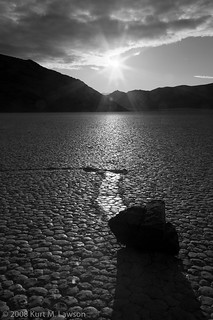
This doesn’t mean I reject outright a lot of these tools that are available. Instead, I use them sometimes to overcome limitations of the camera system I’m using. The biggest example of this is images with huge dynamic range. In a few very select cases I have combined two exposures to lower the exposure of the sky when there is a scene of a dark foreground. This image from the Racetrack in Death Valley is an example. I used an underexposed bracket to bring back some detail where the sun had overexposed: (click for bigger)
This used the compositing power of photoshop to simply compress the dynamic range a little. The scene was not fundamentally altered in any way, and now is closer to what I saw. But wait! That’s black and white! That brings me to:
Black and White Photography
Black and white photography will always be a more liberal interpretation of a scene than color photography. My childhood photography hero Ansel Adams captured amazing scenes and then used his masterful darkroom skills to extract an amazing “performance” from the negative “score.” I will sometimes do some light dodging and burning (increasing or decreasing exposure selectively) in some of my photographs, mostly with black and white interpretations which is not a way the human eye sees. You still wont’ find me adding moons that were not there and skies that were shot at a different place and time. If we use the Ansel Adams analogy I mentioned about the negative being like a musical score and the performance is the print, then I would say I am not going to change out whole sections of music by inserting parts of other scores.
Star Trails and other things the human eye just can’t see
Some photography is by its very nature fundamentally different than the way the human eye sees. I am rather fond of star trail photographs, and the human eye can’t see star trails looking up at the night sky. All my star trail shots are captured at once. I haven’t yet tried to use the “stacking” technique of combining multiple exposures into one star trail image. For really long exposures I just use film.
Panoramas
Finally, we get to my example image, which is a panorama from the flooded Badwater in Death Valley where we began. One compositing technique I have no problem using is combining multiple exposures into a panorama. The result is a super high resolution image that would exceed the capabilities of the camera. The trick is that you have to be quick about it when the light is changing. My technique is to set the camera on manual and carefully and quickly fire off 3 bracket exposures, then rotate the camera, repeat. Manual focus is also important. I’ve had numerous panoramas ruined by changing focus between frames. I always bracket exposures because I don’t trust myself, and I may want the option to restore some detail in an otherwise blown out section of the frame.
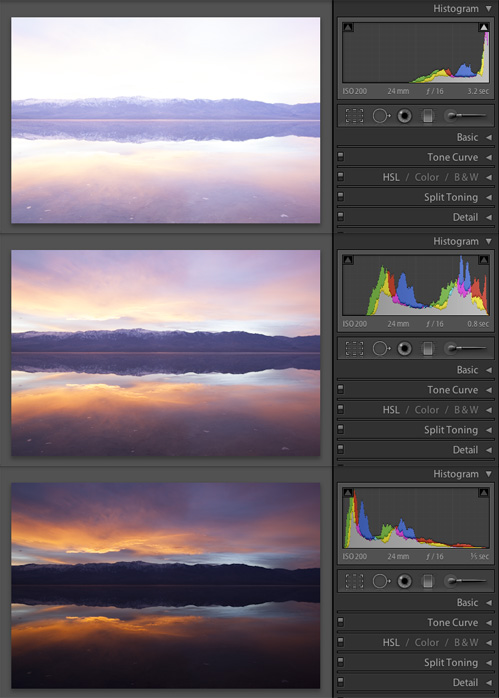
I have just gone through and completely reprocessed the “Wow” panorama as I get ready to print it (the print will be 18 by 70 inches). Why reprocess it? Well with the arrival of Lightroom 4.x, I’ve noticed that images just look better. Lightroom 4 does a much better job with highlights, rolling them off more gracefully. I felt that this image could benefit from some of that. Here are my brackets. The base exposure was 0.8 seconds at f/16 iso 200. A UV filter was on 16-35mm f2.8L II lens at 24mm. Bracket exposures were +/- 2 stops. Brackets for central panorama image The 7 frames of this panorama
This is the three raw files with all settings at default in Lightroom. From here I selected the “normal” exposure. This frame seemed to be the best balance of exposure. Looking at the histogram, the image data bunched up to the right without hitting the wall, meaning no pixels are exceeding the range the sensor could record. Having the pixels bunched up to the right also tends to result in an image with less noise as digital camera noise tends to be very prevalent in underexposed areas in most RAW files.
Notice that this panorama has 7 images. This was not planned. Normally, I would also try to shoot the panorama vertically to record more overall information. However, in a somewhat panicked panorama frenzy, I shot several different panoramas through the magic moments of this sunset. I didn’t know what the light was going to do so I just kept shooting. There are panoramas in my raw library of 6-14 images at all different focal lengths. In retrospect I should have at least had the camera vertically mounted, but that’s hindsight. The light I have decided, was the best at this moment. The panoramas before and after this are just not as dramatic, and this moment was dramatic.
So next I think about what I want to accomplish with the post processing. In this case I am making some adjustments to the overall exposure level and contrast. Besides that I want to darken the sky a little to equalize it with the reflected sky, and then that’s pretty much it besides stitching the panorama together and a pinch of sharpening. Can’t forget dust removal too. I hate sensor dust. Here are the adjustments. I’m not going to go into too much detail as to what each function does, since there are plenty of other resources as to how lightroom’s controls work.
The raw image ready to go in Lightroom Basic contrast, exposure and black level adjustments applied Slight tone curve adjustment Digital graduated ND filters, profile corrections, noise and sharpening
The final result, which I felt captured the essence of what it was like standing there: Central panorama image with all adjustments
I felt like I was between two worlds. The reflection quality was incredible due to the lack of wind. I didn’t adjust saturation / color controls at all. The color is all “straight from the camera”, though there is a natural increase of saturation by darkening the image down a little. I didn’t feel it needed anything else.
A quick synchronize of settings across the 7 images and everything looked good, except for the far right. In that image the Black Mountains had become really black, so I added a grad in the last image of shadows +35 all the way across the frame to feather detail back into the blackness.
Now it was time to stitch. I exported full size 16-bit TIFF files of each of the 7 images and had Autopano Giga look at the folder. Autopano Giga's automatic panorama stitch
In just a few seconds Autopano Giga produced a panorama that was 99% of where I wanted it to be. I ended up exporting the panorama setup to PTGui Pro to do a couple of fine tweaks. I probably could have done the tweaks in Autopano, but I’m not as familiar with it. I used PTGui since before you could automatically generate any points at all. I added a couple control points, re-centered and rotated the panorama slightly to try and keep the horizon as centered and straight as possible. Here’s a screenshot of PTGui Pro showing where the stitch points are:
PTGui showing stitch pionts
I love that Autopano Pro can export setups to PTGui, which I can then tweak.
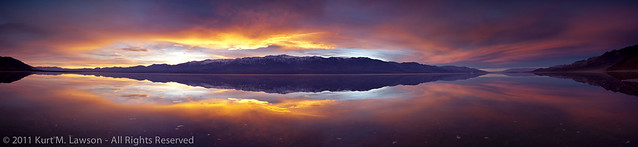
I think the end result is better. Here’s the original (click for bigger):
And here is my reprocessing (click for bigger):
Summary
So there you have one example of my post processing. I don’t do any content-altering compositing. I will use technology to overcome camera limitations such as dynamic range problems (though none of that tone mapped over-processed HDR stuff) and combining images to make panoramas that were shot at the same time (within seconds of each other). I don’t add a moon to shots that didn’t have it. I don’t replace skies with skies shot at other times or places. I don’t remove trees that I don’t like. I capture and then interpret reality. I’m not out to create a fantasy land visual effects shot. I don’t want to create images that could exist. “Here’s what I saw” is what I want my photography to be, not “here’s what I made up in Photoshop.” This is just my philosophy, and I hope you enjoy my photography as I share it. Not every landscape needs to be retouched as much as your average model shot. Nature isn’t perfect, and neither are my photographs. I hope maybe at least a little that my photography will inspire you to go out and see the natural beauty that is in the world around us. It’s everywhere, you just have to look.
Please comment below and let me know what you think.
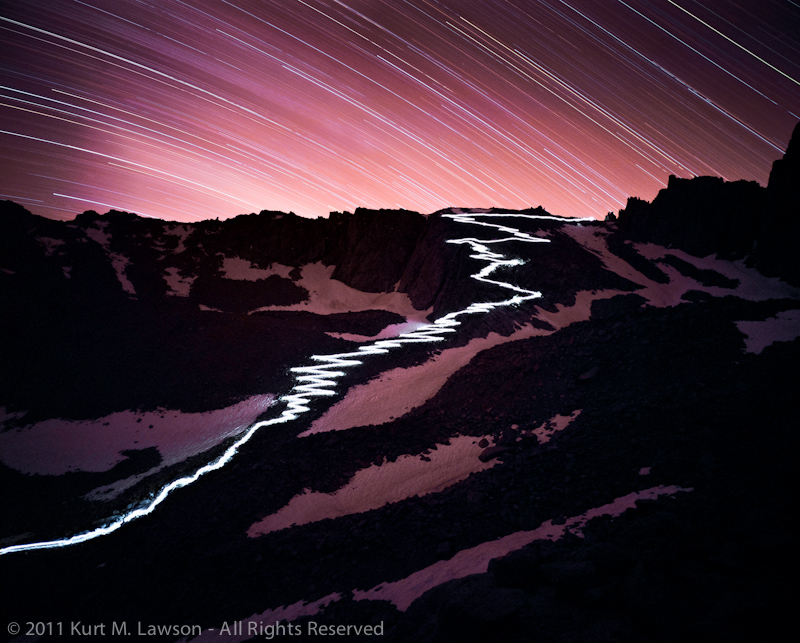
On Saturday March 3rd, 2012 I loaned a print of The 97 Switchbacks At Night for display at the Eastern Sierra Interagency Visitor Center in Lone Pine, California. This is the very same visitor’s center where permits are picked up to climb Mount Whitney. The print measures 24×30 inches and is a FujiFlex Crystal Archive print, with about 4 inches of white matting and a quality black wooden frame. I’m really excited for people to be able to see it. I have twice visited this visitor center to pick up Mount Whitney permits myself, including the permits for this very photo and my own ascent to the summit in 2010. The next time you find yourself in the Owens Valley, stop by and check it out. The FujiFlex print is really something to see compared to the small version online.
The Eastern Sierra InterAgency Visitor Center is located at the junction of US Highway 395 and State Route 136, one mile south of Lone Pine.
In 2005 while driving through the Owens Valley on the way back to Los Angeles from the Lake Tahoe area, I looked out the window of my car at the magnificent crest of the Sierra Nevada Mountains and had a crazy thought. Well, it wasn’t a crazy thought except that for someone like me who had never before climbed a mountain, – I thought it would be great to climb Mount Whitney. This was an idea that would stick in my head for a long time. Slowly, bit-by-bit I would start working towards the eventual goal of standing upon the tallest mountain in the lower 48 contiguous states. Read my writeup of that experience here.
I started doing a number of things to prepare for this goal. I started hiking around in the local mountains of Los Angeles on well-documented trails after picking up a hiking book. I discussed the idea of the climb with a mountaineer friend who had made the trek previously. At his suggestion I eventually enrolled in the Sierra Club’s Wilderness Travel Course in winter 2010. This class really opened my eyes, teaching me important knowledge about backpacking and safety in the wilderness that gave me the confidence to proceed with the plan. We put in applications for the permit lottery that February and I physically started training for the trip. My permit request was denied, but I was later offered a spot on my mountaineer friend’s permit.
Anyone who does research into the Mount Whitney trail will inevitably come across descriptions of the infamous 97 switchbacks (or 99, or is it 98?). At the high camp along the trail, Trail Camp, which sits well above the tree line at 12,000 feet, you come face to face with this section of trail and for the first time the sierra crest is within reach. For 2.2 miles, rising some 1600 feet, the trail zigzags 97 times in close quarters on a slow (some would say monotonous) trek to Trail Crest. One description I read said to be sure to bring your iPod and headphones for this section. Indeed it was seemingly endless, but when you reach Trail Crest (13,600 feet) you can finally see to the west into Sequoia National Park. Another three miles of hiking and I found myself completing the goal I had set out to do some five years earlier.
On the last morning of the trip, I set my 5D2 upon a rock and shot about 12 minutes of HD video of the day’s hikers making their assault on the 97 switchbacks before we headed out. The next day, back home in Santa Monica, I sped the time lapse up and played it.
I was struck by path the people outlined as they zigzagged up the mountainside. An idea dawned on me. What if I took a long exposure of this trail at night, with some lights to light up the path? The idea was intriguing to me. I had done some star trail photography before, and I knew I could find a way to make it work. I would need volunteers to help though. I talked over the idea with some of my new friends from the Sierra Club class and the project was a go.
I immediately wanted to shoot this on large format film. I had a Mamiya 645 Pro camera I loved, but for this project I thought bigger. This was going to be a herculean effort to pull off at 12,000 feet and I wanted to go big and be done with it. So, my original quest involved 4×5 film. I figured this would be a pretty good tradeoff between some really enormous resolution and size and weight to carry up the trail. There was a bigger problem, however. This was December and Mount Whitney permit applications were due in February. When to shoot? What amount of moonlight? How can I take something fairly unpredictable like five-hour exposures and make them as manageable and predictable as possible?
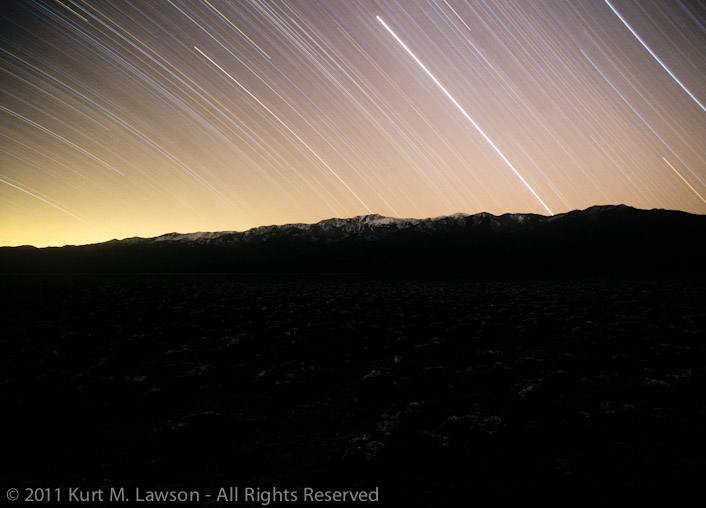
The first question I needed to try and figure out was how much moonlight would be needed to fill in the landscape. I knew the shot would be boring if you couldn’t see where the trail was traveling through. Would starlight alone be enough? I did some tests.
Starlight only at the Devil’s Golf Course in Death Valley
This first round of tests told me I would definitely need some moonlight. With the permit application deadline looming I looked at a chart of all the sunrise, sunset, moonrise and moonset data for 2011. What should I look for in this data that would allow me to scientifically test exposures before the big shoot? I looked at GPS data from my ascent and descent of the 97 switchbacks from a few months before. I saw that it took about an hour and a half to descend from Trail Crest to Trail Camp. I decided to focus on this interval. I would look for at least an hour and a half between total darkness and moonrise. This would allow the descent with a light to light up the trail, and then a variable time afterwards that I could test for to fill the landscape with a rising moon. Since the moon would rise in the East and has a fairly unobstructed path to the switchbacks, it would serve as a giant fill light in the sky. This would be a delicate balance, however, as too much moonlight would wash out the star trails in the sky above trail crest. With the target dates in mind, permit applications were sent in to the Mount Whitney Permit Lottery. You can see the dates ranked by choice for each month. With 200% snowfall the previous winter, August and September were the targets, with the moon dictating the dates. In May we received the results. We had obtained permits for the choice dates in both August and September: there was a first attempt and a backup date.
Now, it was time for testing the exposure. With my demanding day job, I had to find time to get away for long weekends to do nighttime exposure tests. I needed north-south mountain ranges as test subjects so as to be as close as possible to the target range while being easily accessible for testing alone. Death Valley was a great spot for this, since the north-south Panamints were not far from the Sierras and the isolation meant I could safely set up multiple cameras and not have any thought of company – human or animal – disrupting my exposures. I scrambled together as many film cameras and tripods as I could manage to test different film stocks and exposure lengths. I ended up using two Mamiya 645 Pros, a Mamiya 645J, an Olympus OM10 and an Olympus OM1N, as well as once a rental Mamiya 7II.
Being initially focused on 4×5, I settled on an aperture of f/5.6 for the shot, given that most large format lenses don’t get much faster than this. All my tests were done with this aperture after my initial test shot had shown that this produced nice interesting star trails. Online I started researching 4×5 photography and I soon discovered that there were some potential issues with the film moving as the temperature changed in the camera. I would have to somehow tape the film in place. I also would have to rent the camera. Given my lack of large format experience, I became concerned that I wasn’t going to have the time to perfect technique to make it work right in time for the shoot, even though it was ultimately nine months away. I decided then the next best thing would be the largest medium format camera solution I could find. The Mamiya 7 platform became the obvious choice. Compact, lightweight 6x7cm medium format cameras with sharp lenses. If possible, I was also going to take my Canon 5D Mark II kit to take other photographs and to do a digital version of the shot as backup in case something went wrong with the film cameras.
One problem I knew I could be facing was condensation. Dew. This could ruin the photo, and something had to be done to prevent it. To combat this problem, I picked up a Dew-Not. This is a little controller/heater for heating lenses and telescopes to prevent condensation. To power it, I picked up a 9600 mAh lithium ion battery pack from eBay. I tested this in Horseshoe Meadow, a place nearby in the Sierras at almost 10,000 feet. I had seven cameras. The two cameras with the Dew-Not attached had no condensation, while the other cameras fogged up and covered with moisture by the end of the exposure creating a foggy look that would be unacceptable in the final image. I picked the lithium ion battery to save weight. You really feel every pound you carry up to 12,000 feet, so that additional expense compared with NiMH batteries was a no-brainer.
Horseshoe Meadow with dew on the lens
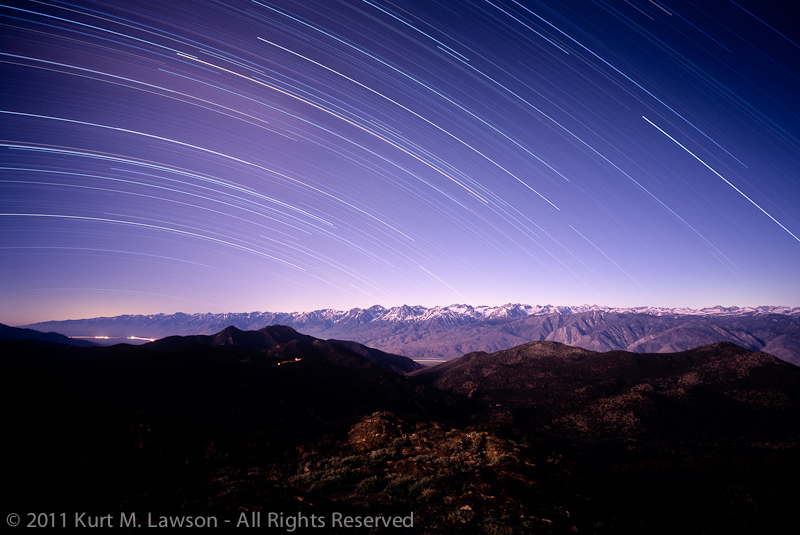
Over the next several months I would make several test trips to Death Valley, the Alabama Hills, Horseshoe Meadow and the White Mountains to do test shots with my array of cameras. With these tests I was able to narrow down the exposure to a target. The exposure would be five hours long starting at the end of astronomical twilight. Astronomical twilight is when there is no longer any sunshine in the sky, only starlight. The moon would then rise 2 hours later to fill in the landscape.
High Sierra Trails – The Sierras from the White Mountains
The same camera, same lens, same film and almost same exposure were used to make the final image. Note how blue the sky is.
By now I was feeling confident about the overall exposure. I had a formula that seemed to work. I had gear to prevent dew. I had the camera picked out. There was one thing that was missing. What was I going to use to light up the trail? A frantic search ensued. I scoured the Internet for the brightest, smallest lantern I could find. Would simple headlamps be enough? Would I need a super bright LED lantern or an even brighter gas lantern? These questions would haunt me in the days leading up to the actual shoot. The biggest problem I had was testing. I needed to go out and test different light sources, but none of my volunteer friends were available when I was. My erratic freelance work schedule meant people who had “real” jobs would not be able to accompany me, and there was the question of where to even do such a test. I needed somewhere on a slope where the camera was between 1500 and 5000 feet away from the light. I just wasn’t able to find an effective location, and was often too exhausted to attempt to do all of it myself late at night in Death Valley, for instance. So, I took a big gamble.
One thing that was clear to me with the light was that it needed to be omni-directional. No matter where the lantern was on the trail, I needed the camera lens to see the light source directly. This would maximize the effect of streaking across the film as the bright source of light itself would be visible. Had I used just headlamps I fear I would have been at the mercy of what direction the headlamps were facing, resulting in reduced intensity when facing away. I didn’t want a dotted line.
Asking around online, I read that the light of a bright star in the sky is approximately 100 lumens. The brightest LED lantern that I ended up finding was this one. This lantern weighs in at 580 lumens. I figured a star travels slower than the people were going to be through the exposure, so the light produced by a this lantern would be enough to make a strong streak through the entire 97 switchbacks and have it read properly on film. I purchased two of them. Each requires 8 D batteries for power. This was going to be fun to carry up to the top.
All the originally planned gear, ready to be packed and loaded
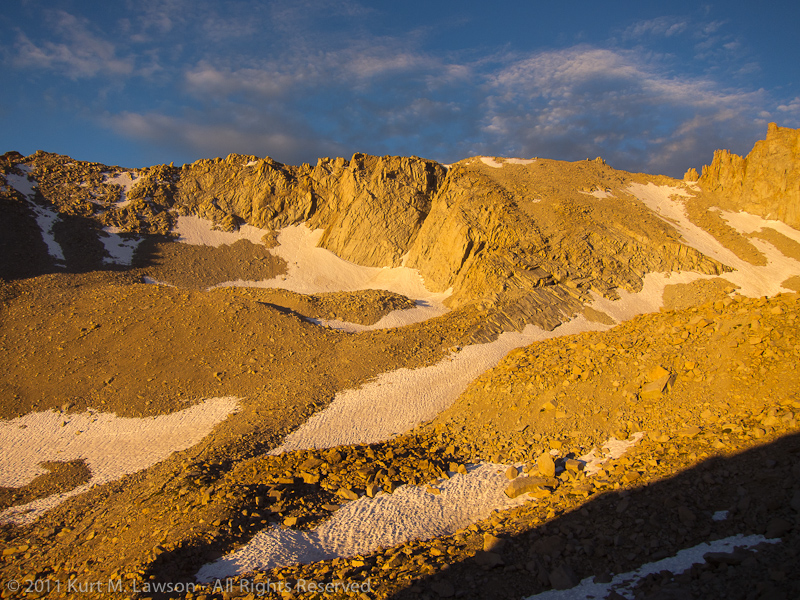
With all the gear figured out, there was a question of where to shoot the photo. Scouring Google Earth and any picture I could find on Flickr and Google Images, there was a clear choice for the proper field of view required. Wotan’s Throne. The summit of this nearby rock seemed to be the nearly perfect place. This posed certain problems, however. Physically it was another 750 feet or so of elevation gain involving class three rock scrambling. How could the camera be safely started and stopped in the night from there? These questions would not be resolved until the day of the shoot.
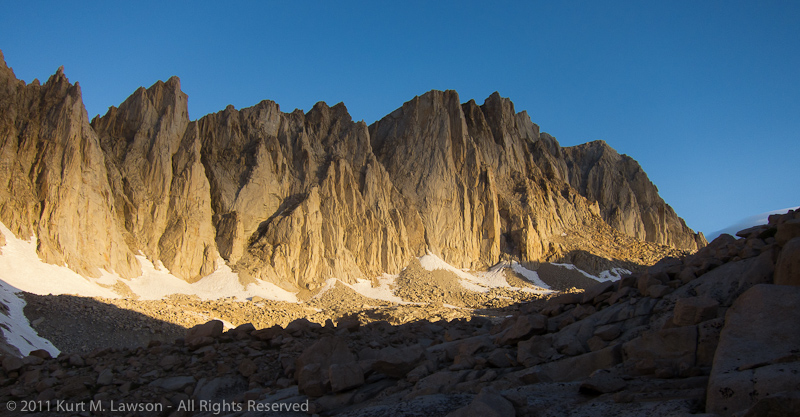
First light on Mt. Whitney. Wotan's Throne in shadow
For this expedition I had a lot of help from friends. In the planning of the expedition, providing advice and wrangling the team that would ultimately help me carry out the shot, friend Kim Homan was a tremendous help. She and friend Michelle Orem were the first two people to join in. Kim helped me keep things safe and provided insights that greatly helped. Brad Anderson and Michelle assisted with a scouting climb to the Trail Camp area on July 17th. Stacy Sanchez and Koichi Minamizuka volunteered to carry the lantern up and down from Trail Crest, after they had climbed to the summit of Mt. Whitney earlier in the day! Bill Becher lent his help in carrying gear and mountaineering expertise. My good friend Ben Keil helped carry gear and summited Mt. Whitney with Stacy and Koichi. A. Michael Dobbs accompanied me on one of my test exposure runs, helping to move gear to Horseshoe Meadow and back in the middle of the dark. Thanks too to Dwain Roque for providing some consultation and lending me some gas lanterns, even though I ended up going the electric route. A huge thank you again to all of you.
Finally the time of the shoot arrives. Koichi and I had gone and spent some time in the White Mountains to help acclimate to the altitude a few days early. We then moved over to the Mount Whitney Portal area to meet up with the rest of the team. Our Mount Whitney Permits were three day permits, for August 20, 21 and 22. This was to allow for one day to hike to Trail Camp. On day two Koichi, Ben and Stacy would climb to the summit while the rest of us hung out exploring, acclimating or setting up for the shot. That second night we would do the shot. Day three we would pack up and hike out and have some celebratory drinks. Everyone would carry four to five pounds of gear except for me. I would carry 10-12 pounds of gear.
Then disaster struck. With everyone finally assembled I began to feel ill. Despite trying to acclimate early, I began to feel sick at our camp in Whitney Portal, elevation 8300 feet. By dinnertime I couldn’t hold anything down. I continued to feel ill into the night and on through the next morning. When I got up, I decided the best thing to do was for me not to proceed up that day as planned. My crew volunteered to take gear up to Trail Camp anyway in case I felt better, and I resolved to spend some time down in the valley in the higher air pressure and then attempt to join them Sunday morning. So, I watched my crew depart without me on Saturday morning, and headed down to chill and try to feel better. Since things were uncertain, I stripped down the gear. No more 5D, only 1 tripod. Just the bare minimum gear to get The Shot was taken up. I radioed that evening I was feeling better and would be making the trek up the next morning.
Alone, with a little help packing my overstuffed backpack from Brad Anderson and Val Nathan, who were getting ready to do their own assault on the East Buttress of Mt. Whitney, I headed up with my 52 pound load. Seven hours, six miles and 3700 feet of gain later I arrived triumphantly at Trail Crest and met up with the rest of the crew. After dinner, Kim, Bill and I headed up towards Wotan’s Throne and Stacy and Koichi headed up towards Trail Crest with the lantern. While they were making their ascent, we scouted out a place for me to camp and set up the photo. We climbed 265 feet up before settling on a spot where I could set up the cameras and sleep nearby, allowing for an unobstructed view of all 97 switchbacks. Kim and Bill helped me set up camp and secure the tripod with rocks and tie lines and then they headed back to camp below. I was alone with my gear and my brave friends were climbing the switchbacks for a second time this day.
Two Mamiya 7II cameras with 43mm lenses were used. My Gitzo GT3531s tripod was tied down with a bag of rocks and tie lines to secure it against the wind. More tie lines and zip ties anchored a Gorillapod Focus with the second Mamiya 7II off the side of the Gitzo. Cloth generic cable releases taped down with duct tape provided shutter control. The Dew-Not heater was installed and engaged with the Lithium Ion battery.
Framing the shot. Photo by Bill Becher
Checking my phone, I pulled up The Photographer’s Ephemeris to check actual astronomical data for my location. I had roughly planned start and stop times ahead of time, but that was using military data from nearby Lone Pine. At 9pm, I opened the shutter. Shortly afterwards, Koichi and Stacy turned on the lantern at Trail Crest. Instantly I knew the streaking trail through the switchbacks would be ok. The lantern was bright!
At this point I was not feeling well again. My stomach was in extreme knots. I was dry heaving. I couldn’t do much other than watch the light and feel ill. After about 45 minutes of watching the lantern I had to lie down in my tent to keep warm and try to relax. Every 15 minutes I would peek out at the light to check on my friends. Their radio had failed so I couldn’t talk to them. After about two hours they had made it back to Trail Camp. I watched them arrive down there and then chatted briefly when they got a hold of one of the other radios. I passed out until 1:00 am when I awoke to check on the cameras. I peered out and clouds had started to roll in. I had planned to keep the exposure open a bit longer, but closed the shutters a little early about 1/2 hour later for fear that the clouds would wash out the star trails. I turned off the dew-not heaters and attempted to sleep. I did not sleep well. The next morning I got up to a spectacular scene. The light was fantastic. I found myself really wishing I had my 5D2 with me. I snapped away with my Canon s95 pocket camera. I awaited rescue from Bill and Kim who arrived to help me pack out from my solitary camp. I was feeling much better.
Spectacular light the next morning
Things look a lot different in the morning alepnglow. Can you even make out one of the switchbacks here?
The trek down was uneventful. I was filled with relief and anxiety. We had done it. But, with film we would not know the results until I got the it back from the lab. Back at the Whitney Portal Store we all had a burger and a beer in triumph, and then broke apart for our respective drives back home.
Film back from the lab
Tuesday at noon I had the film back. The lantern path was a success. A pure white streak outlined the switchbacks. The rest of the image was pretty dark, however, darker than expected. I raced home to scan it immediately. I put the film into my Nikon LS9000ED and checked it out. It looked like it could be amazing, but the first image was a bit blurry. I was concerned. I scanned the second exposure. The first one had been the one on the Gorillapod. The second was the one on the Gitzo directly. It was sharp. I was relieved! It looked great, however the path itself looked like it had flared the lens. I sent the film off to get professionally drum scanned at James Beck Digital. This new scan blew me away. The shadow areas were more filled in and the strange flared halo from the trail was gone.
At last, it was complete. Months of planning had paid off. A herculean effort from my team had helped me achieve the image I sought to achieve. The color was a surprise. My other tests had produced more blue, but the result is striking. I love it.
Compare with the daylight picture the next morning just above.
Once more I have to say thank you to my friends who volunteered time to help out on this quest. It was a fun adventure, and I think the result speaks for itself.
Mount Whitney has solidified a special place in my heart. The quest was really quite an adventure, and was a catalyst for my discovering this world of wilderness landscapes not accessible by car. In fact, while on this mountain I conceived an idea for what could be a stunning photograph. This is a project that occupied the majority of my free time this year, and will be the subject of future writing and hopefully publishing (more on that soon). The project provided impetus behind most of my road trips since January this year, spending long nights doing star trail photography in the desert with several test cameras and tripods. I’ve visited the area several times as a result, and here is a selection of images of the varied face of Mount Whitney.
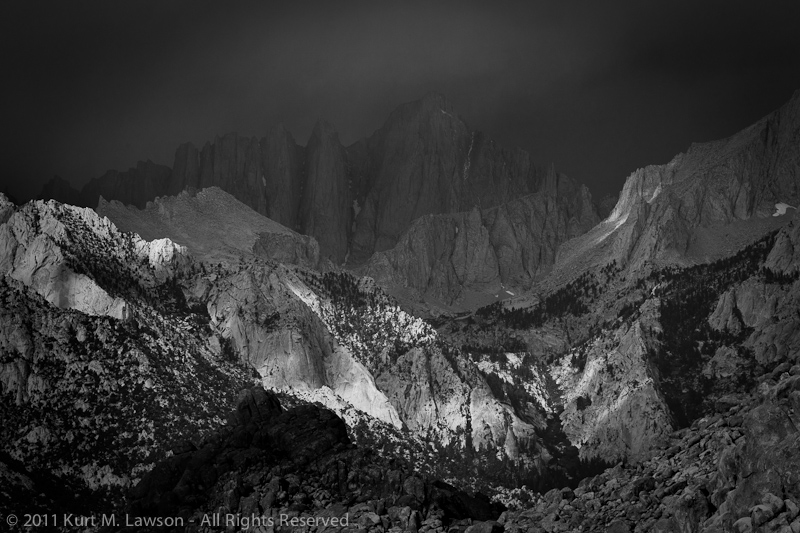
Whitney in the shadows
Here she is in September masked by a thunderstorm
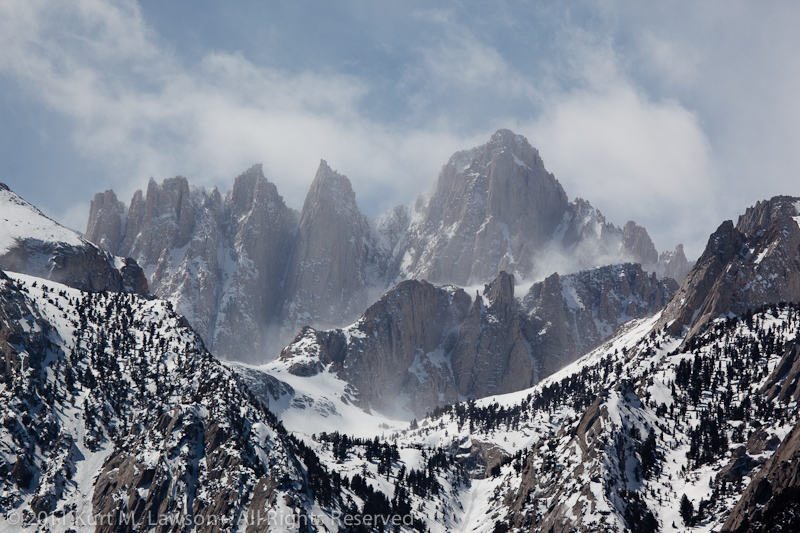
Windy Winter on Whitney
Mount Whitney in March showing off what a high Sierra winter looks like
The moon over Mount Whitney
In June patches of snow were definitely still lingering
Morning Twilight on Mount Whitney
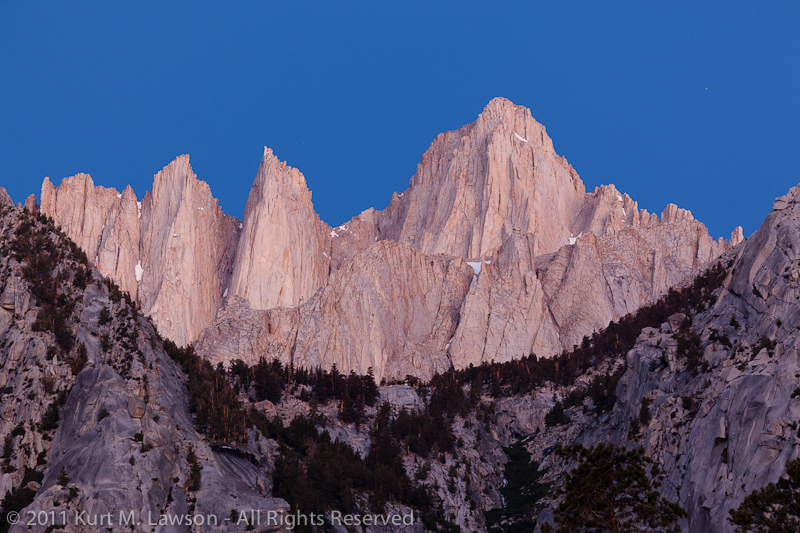
A morning twilight view in July shows subtle and beautiful subdued tones
First moonlight on Mount Whitney
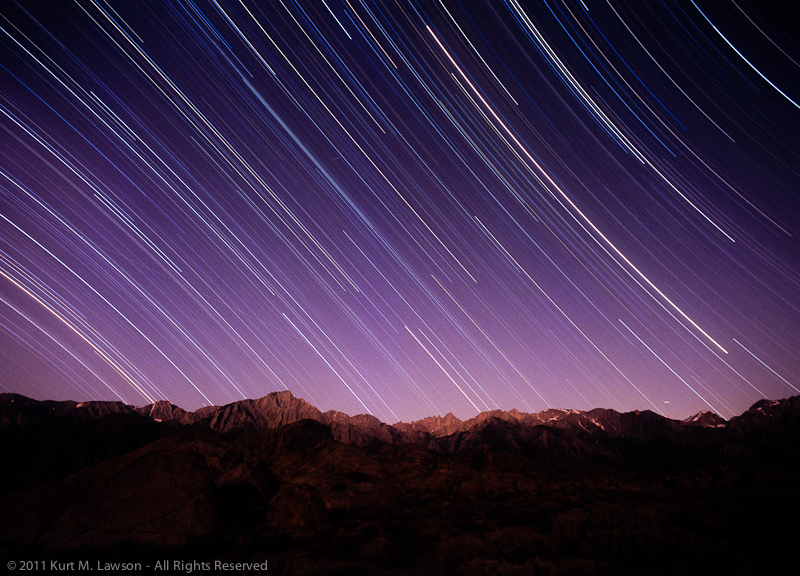
Finally a view from the Alabama Hills, by moonlight and starlight. This exposure, approximately 4 hours on film, captures the first bit of moonlight lighting the top of the eastern Sierras after a few hours of total darkness.
This striking peak has held captive over me this year, and I do not doubt I will revisit her again.
As a bonus I shot video of the crazy wintery conditions on Whitney back in March.